


Receive IAMMETER Energy Alerts in WeChat
title: Receive IAMMETER Energy Alerts in WeChat
abstract: Receive IAMMETER alerts directly in WeChat.
author: Jessica
language: en
Why IAMMETER Added WeChat Notifications
IAMMETER Cloud already provides a complete alert and notification system. Users can create alert rules based on energy consumption, current, power, device offline status, and other conditions, then send messages to selected recipients through notice groups.
Until now, this workflow has mainly relied on email. Email is useful for record keeping and reporting, but it is not always the fastest channel for real-time alerts. One important reason IAMMETER added WeChat notifications is that WeChat is being used by more and more users across different countries and regions. It is no longer only a local communication tool for a single market.
By adding WeChat as a notification channel, IAMMETER allows more users to receive alerts in a messaging app they already use every day. That makes notifications easier to notice, faster to act on, and more practical for daily monitoring.
This is not a separate notification system. WeChat has been added as a new channel inside the existing IAMMETER notification framework, so users who already use IAMMETER alerts can adopt it with very little extra setup.
Where WeChat Notifications Are Useful
WeChat notifications are especially useful for:
- users who want to see abnormal energy usage, offline devices, or threshold alerts as quickly as possible
- solar and home energy monitoring users who want to reduce the chance of missing an email alert
- installers and maintenance teams who need cloud alerts sent directly to a mobile messaging channel
- users who also want a lightweight way to access IAMMETER account information from WeChat
For projects focused on home energy monitoring, solar monitoring, and reducing electricity bills through better energy management, alert timing often matters as much as the monitoring data itself.
How WeChat Fits into the Existing Notification System
The IAMMETER notification structure can be understood in three layers.
1. Contacts
First, create a contact. Previously, contacts mainly stored email addresses. Now a contact can also be bound to WeChat.
2. Notice Groups
Next, add one or more contacts into a notice group and choose the notification method. With WeChat support added, the same notice group can now be used for WeChat delivery.
3. Notification Rules
Finally, connect the notice group to a specific notification rule. When the rule is triggered, IAMMETER sends the alert through the configured channel.
From this perspective, WeChat does not replace email. It extends the existing notification chain. You can still keep email for records and use WeChat for faster real-time awareness.
How to Set Up WeChat Notifications
The setup process follows the same logic as the existing IAMMETER notification workflow.
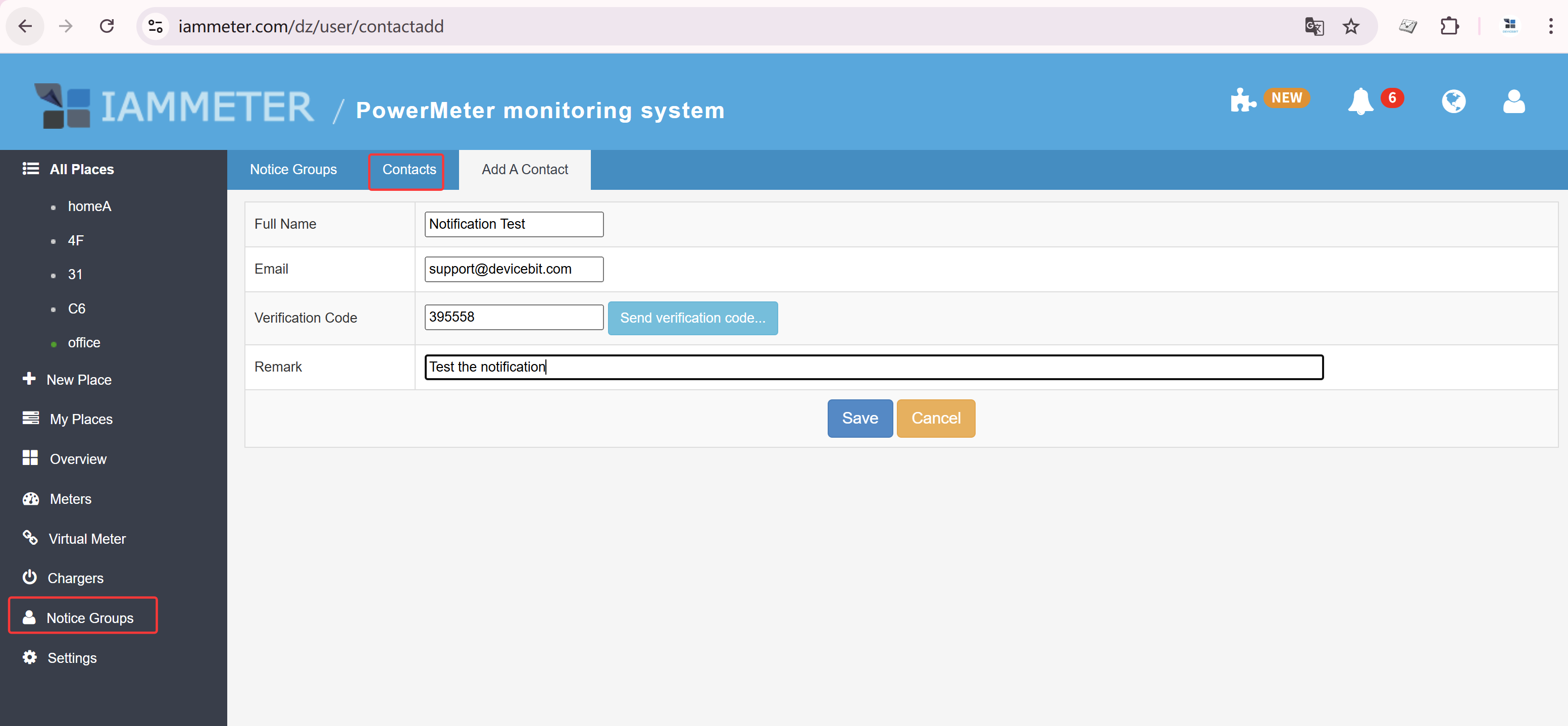
Step 1: Create a Contact and Bind WeChat
Go to Notification -> Contacts, create a new contact, enter the email address, and bind the contact to WeChat.
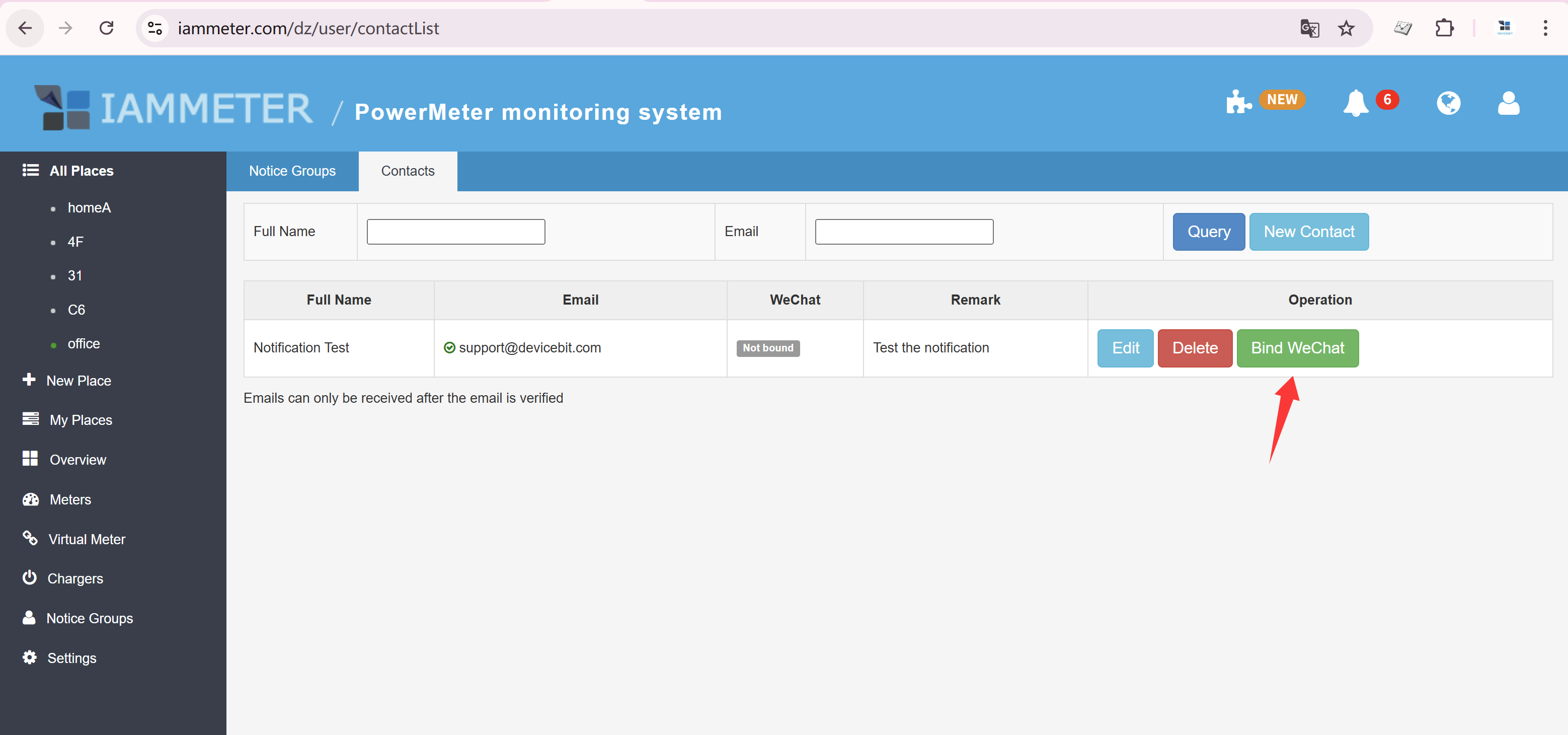
This step defines who will receive the notification. All later notice groups and notification rules are built around the contact.
Step 2: Create a Notice Group and Select WeChat
Go to Notification -> Notice Group, create a new notice group, choose the contact you just created, and enable WeChat as the notification method.
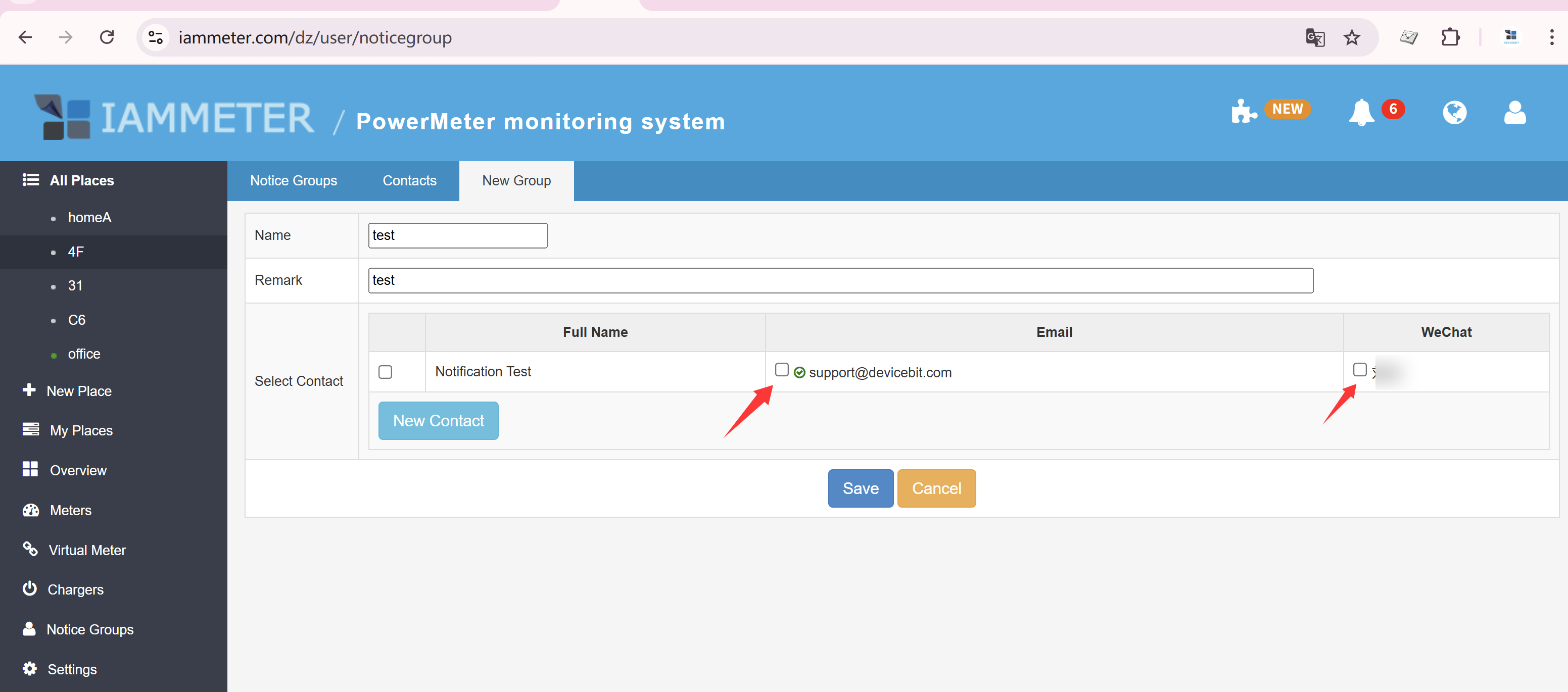
If you already use IAMMETER notifications, this step is usually just an update to an existing workflow rather than a full rebuild.
Step 3: Link the Notice Group to a Notification Rule
After the contact and notice group are ready, create or edit a notification rule and assign that notice group to it.
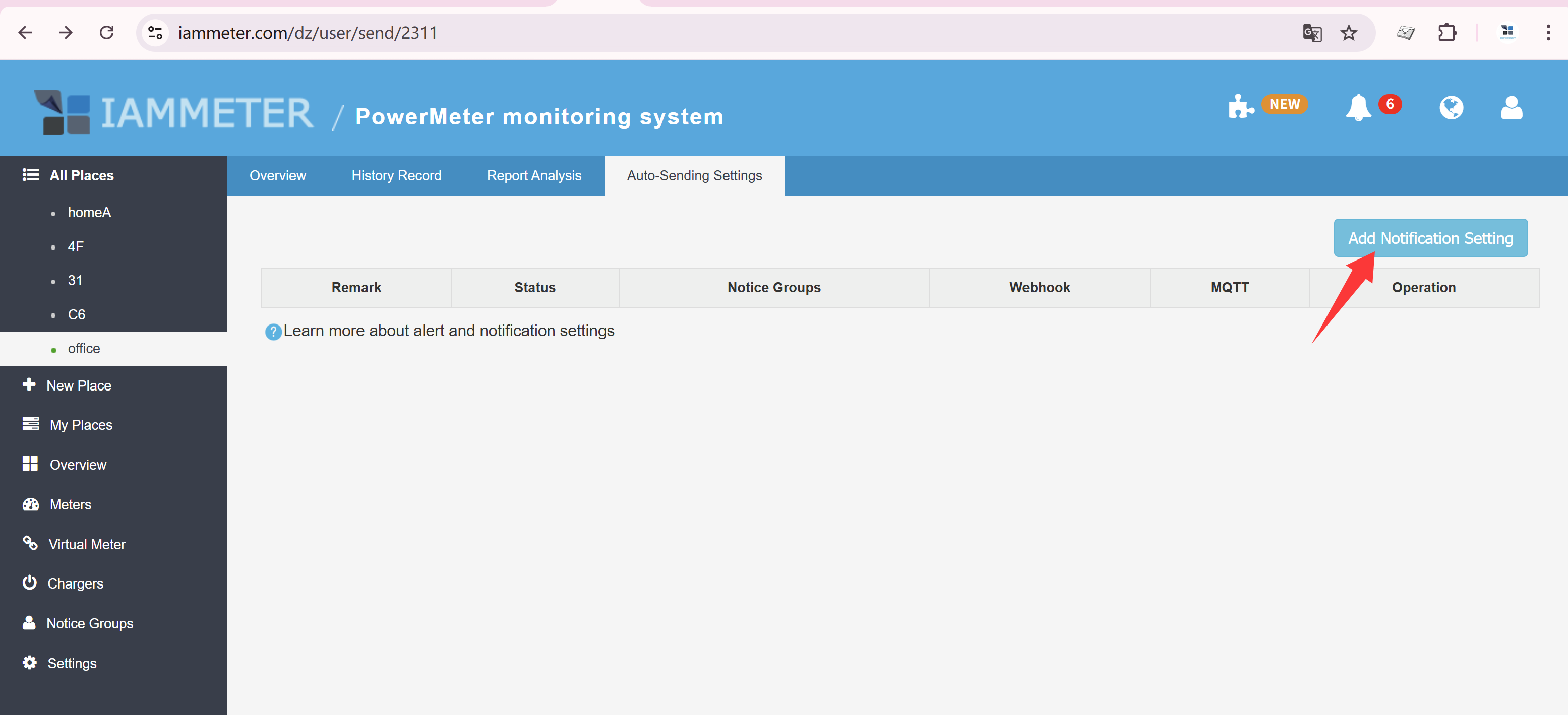
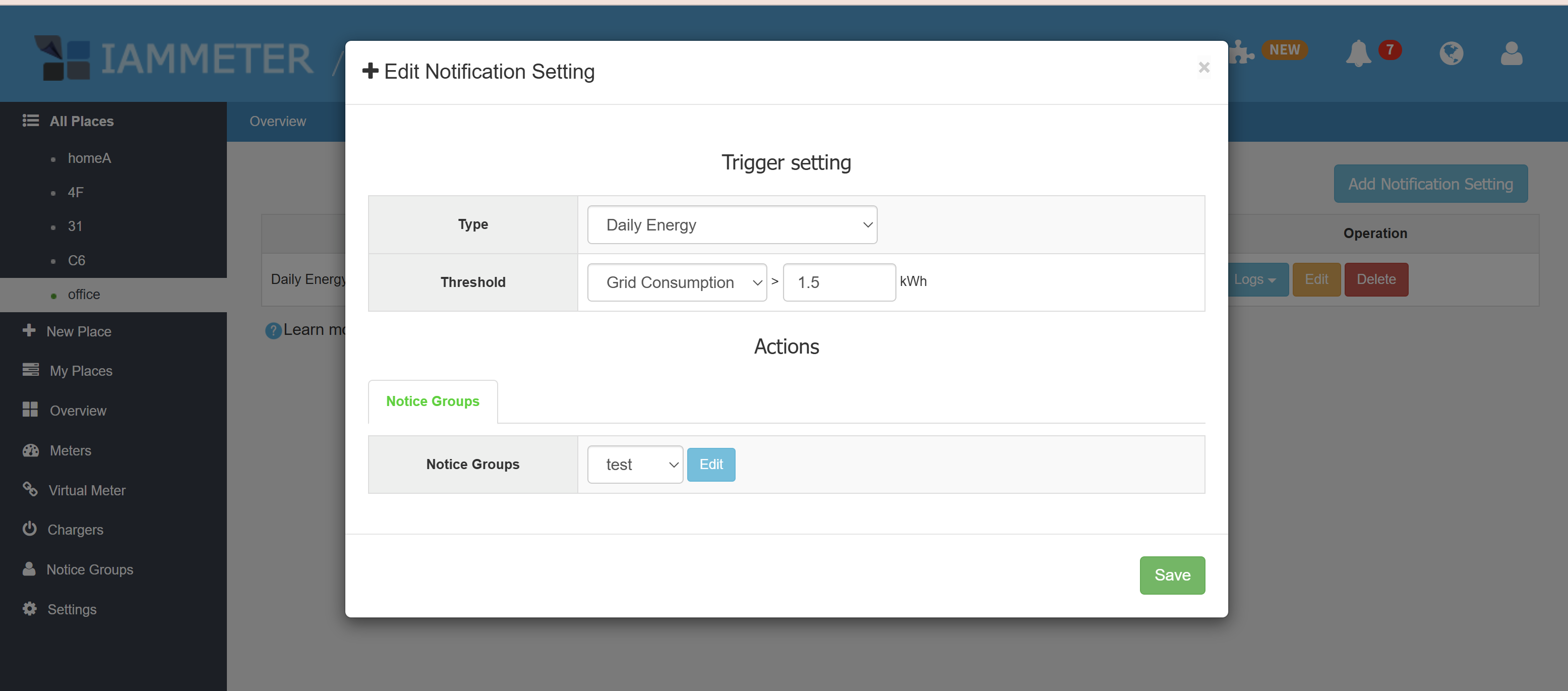
According to the feature notes in wechat.md, real-time notification rules now support WeChat delivery. In the example below, the alert type is daily grid consumption. When the configured threshold is exceeded, IAMMETER pushes the alert to WeChat.
Step 4: Receive the Alert in WeChat
Once the rule is triggered, the user receives the alert directly in WeChat.
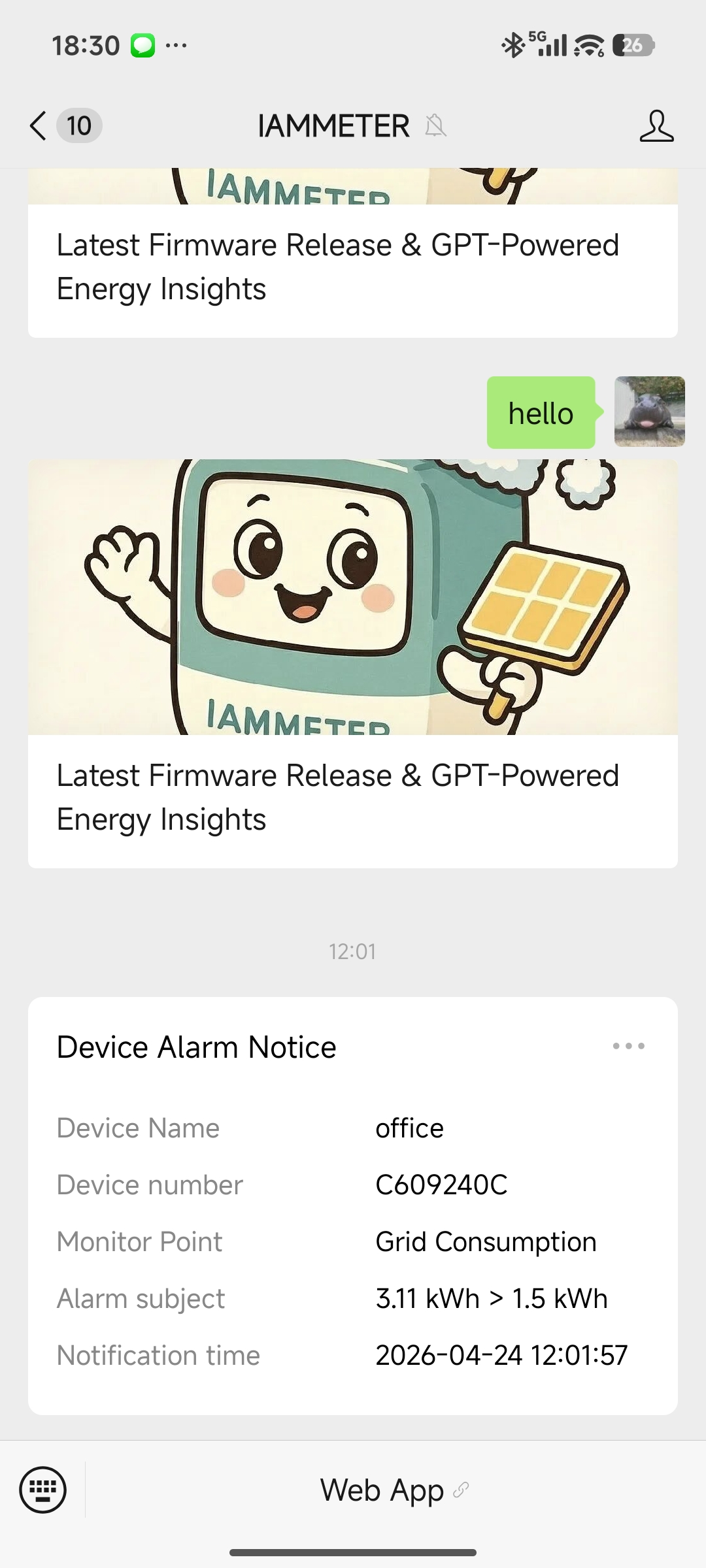
Compared with email, WeChat is often better for alerts that need fast attention, such as:
- device offline events
- current or power exceeding a threshold
- daily grid consumption exceeding the expected limit
How to Check Notification Logs
WeChat solves the "see it quickly" problem. The notification log still solves the "track it later" problem.
In IAMMETER Cloud, you can view the notification log to confirm whether a rule was triggered, when it happened, and whether the message was sent successfully.
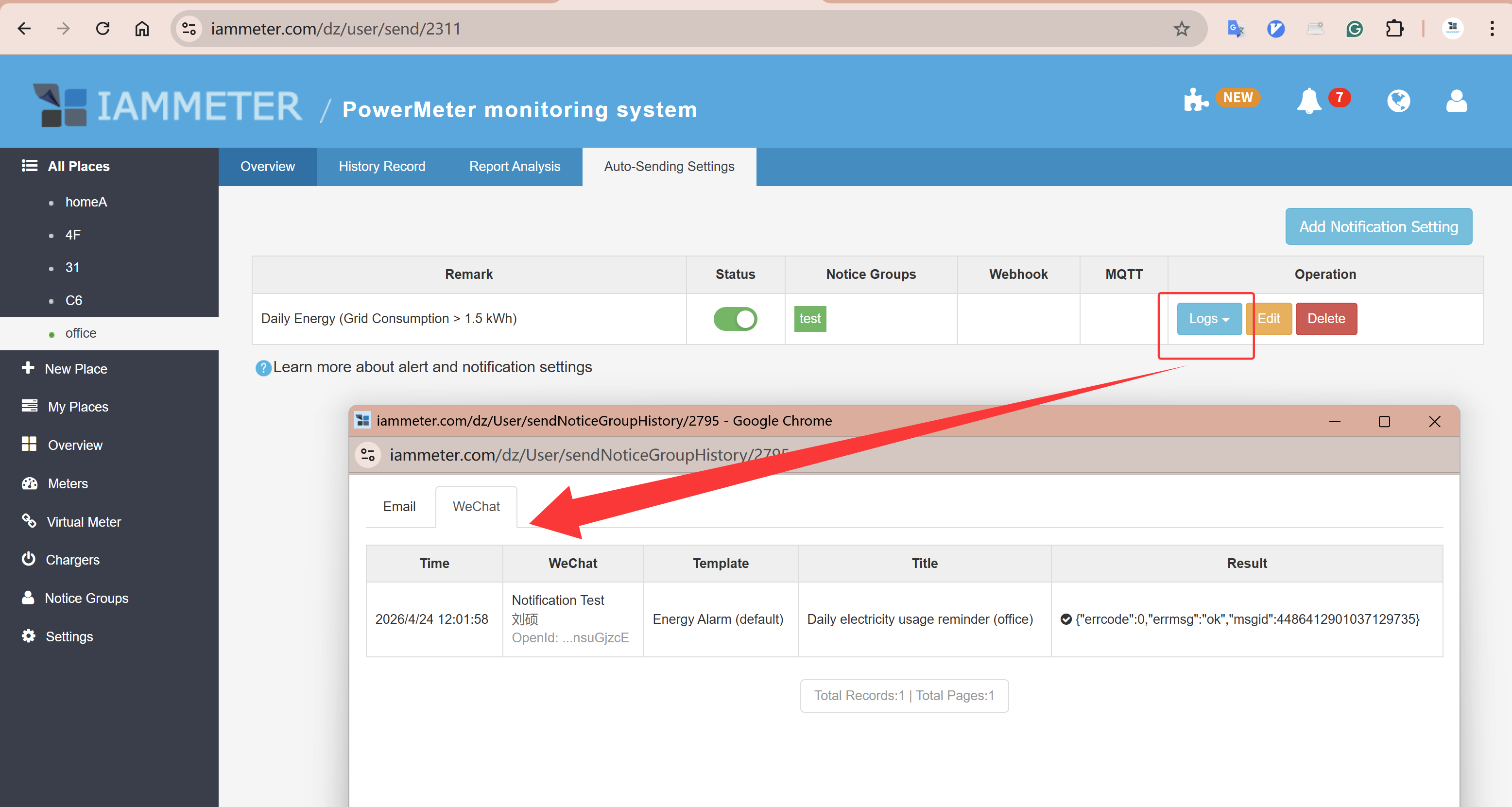
This is useful for troubleshooting, tuning alert rules, and reviewing abnormal events after they occur.
WeChat Can Also Be Used to Access Your Account
This update is useful not only because it adds push notifications. You can also access your IAMMETER Cloud account through WeChat.
That is consistent with the earlier IAMMETER capability described in View Data by WeChat. Previously, WeChat was more focused on data viewing and lightweight account access. Now IAMMETER has expanded its role by adding proactive notifications as well.
From the user perspective, this makes WeChat a more complete interaction channel inside the IAMMETER ecosystem:
- it can act as an account access entry point
- it can also work as a real-time alert channel
That means users can complete some of their most common monitoring interactions in WeChat without needing a separate dedicated app.
What Value This Update Brings
From a technical perspective, WeChat is just a new notification channel. From a user-experience perspective, it makes IAMMETER alerts easier to integrate into everyday workflows.
Its practical value is mainly reflected in three areas.
Faster Response to Abnormal Events
For offline devices, high consumption, or unexpected power conditions, a WeChat message is often seen sooner than an email.
Better Fit for Everyday Communication Habits
As WeChat is used by more people across different countries and regions, delivering alerts into WeChat lets more users receive notifications in a messaging channel they already check frequently. That reduces the chance of missing important alerts.
A Stronger Monitoring-to-Optimization Loop
IAMMETER is not only for collecting data. Its real value is helping users detect problems, adjust energy usage, improve solar self-consumption, and ultimately reduce electricity bills. The faster alerts reach the user, the easier it is to make that loop work in practice.
Conclusion
IAMMETER already had a complete alert system with rules, contacts, notice groups, and logs. By adding WeChat delivery, IAMMETER now gives users a more immediate and more convenient way to receive alerts while still keeping email available for records.
If you already use IAMMETER Cloud notifications, enabling WeChat is a low-friction upgrade. If you have not used the notification module yet, this is a good time to start.
Related links: