Turn solar generation into lower electricity bills

Solar Energy Monitoring System

Solar panels do not automatically guarantee savings. To get the most value from your system, you need to know how much solar you generate, how much your home uses directly, how much is exported to the grid, and when you still need to import electricity.

A solar energy monitoring system gives you that visibility, so you can improve self-consumption, reduce unnecessary export, and make smarter decisions about your loads, tariffs, and automation.

Demo behavior: mobile browser opens an app-style interface, while desktop browser opens the full IAMMETER-Cloud dashboard.

Solar
Generation tracking
Import / Export
Grid interaction visibility
Self-Use
Optimization potential
Solar Dashboard
Example IAMMETER-Cloud solar view
Online
Solar Output
4.8 kW
Home Load
3.9 kW
Grid Export
0.9 kW
Solar vs Consumption
Generation and use throughout the day
Today
Home load
Solar output
Why solar users monitor
Use more. Waste less.

Monitoring helps answer the question that matters most: are you really using your solar power at home, or just exporting it at low value and buying power back later?

Suggested next step
Explore self-consumption optimization
What it is

What Is a Solar Energy Monitoring System?

A solar energy monitoring system shows the relationship between solar generation, household consumption, grid import, and grid export. It goes beyond a basic inverter display by helping homeowners understand how solar fits into the full energy flow of the home.

Good solar monitoring does not only show how many kilowatt-hours your panels produce. It also shows whether those kilowatt-hours are being used at home, exported to the grid, or replaced by imported power at other times.

1
Solar Generation
See how much energy your PV system produces in real time.
2
Import and Export
Track what goes to the grid and what still comes from it.
3
Self-Consumption Insight
Understand how much of your solar is used directly at home.
Why it matters

Why Solar Monitoring Matters More Than Ever

In many regions, feed-in tariffs are lower than the value of electricity you buy from the grid. That means exporting solar is often less beneficial than using it directly at home.

Without monitoring, many solar users assume their system is delivering maximum savings simply because it is generating power. In reality, the difference between exporting solar and consuming it at the right time can have a big impact on long-term returns.

☀️

Solar Homeowners

You want to see whether your solar power is really used at home or mostly sent to the grid.

See solar monitoring application
💡

Self-Consumption Optimizers

You want to shift loads into solar hours and reduce the amount of energy exported at low value.

Explore PV heater control
🔌

Advanced Smart Home Users

You want solar data available in dashboards, local APIs, and automation platforms like Home Assistant.

See Home Assistant integration
Core features

What a Good Solar Monitoring System Should Show

The goal is not just to see solar production. The goal is to understand solar in context: how it interacts with your home, your loads, and the grid.

Solar Generation Tracking

See how much your PV system is producing throughout the day and compare generation patterns over time.

See solar monitoring details

Grid Import and Export Monitoring

Know when you are feeding power back to the grid and when you still need to buy power from it.

Track import and export

Self-Consumption Insight

Measure how much solar energy is used directly at home instead of being exported.

Explore optimization examples

Historical Solar Analytics

Compare daily, weekly, and monthly solar performance and understand seasonal or weather-related differences.

Explore cloud analytics

Open Integration

Bring solar monitoring data into Home Assistant, MQTT workflows, Modbus/TCP systems, and custom applications.

View integration guide
IAMMETER Advantage

Monitoring + Solar Optimization

IAMMETER helps users move beyond passive monitoring and into practical optimization of solar self-consumption.

Use cases

Built for Real Solar Monitoring Scenarios

Home Solar Performance Tracking

Understand how your solar system performs each day and how that performance relates to your household demand.

View solar monitoring setup

Solar Self-Consumption Improvement

Use monitoring data to identify opportunities to consume more solar directly, instead of exporting it at low value.

See PV heater control example
Recommended

Solar + Smart Home Integration

Use Home Assistant and other platforms to build solar-aware dashboards and automations using real monitoring data.

Open Home Assistant guide
Energy flow

See Where Your Solar Energy Goes

One of the biggest reasons to use solar monitoring is to answer a simple but important question: does your solar power serve your home first, or does too much of it leave the house before you get the full value from it?

The answer affects how you schedule loads, how you think about batteries, and how you plan the next step in your energy system.

Explore the solar PV monitoring application
☀️
Solar
🏠
Home
🔌
Loads
🏠
Excess
Grid
Recommended principle: use solar first, export only what you cannot use.
IAMMETER solar solution

A Practical Solar Monitoring and Optimization Solution

For residential solar users, a cost-effective solution matters as much as visibility. IAMMETER provides practical options for single-phase, split-phase, and residential three-phase solar scenarios, so homeowners can start with monitoring and expand into optimization when needed.

Solar Monitoring
Track solar generation, household load, and grid import/export in one practical system.
Cost-Effective Hardware
Choose the right meter for single-phase, split-phase, or three-phase residential solar.
Optimization Path
Use solar surplus more effectively with dedicated load control.
Recommended for cost-effective home solar monitoring
WEM3050T

A practical and affordable three-phase meter for residential solar users who want reliable monitoring with IAMMETER-Cloud Basic.

View WEM3050T
Recommended for split-phase and single-phase solar
WEM2067

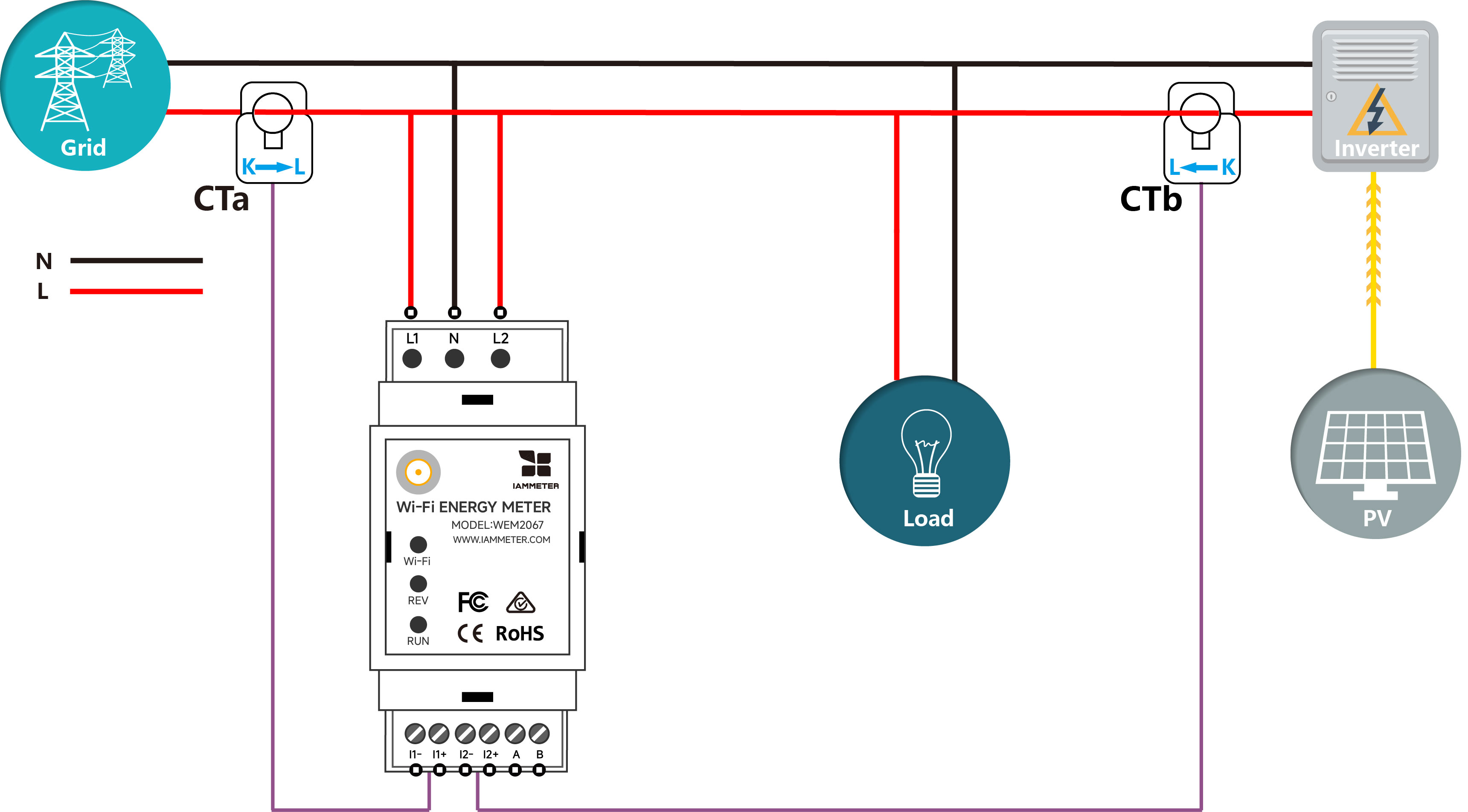
A cost-effective dual-phase meter ideal for North American split-phase systems. It can measure split-phase grid consumption directly, or use one channel for inverter output and one channel for grid interaction in a single-phase PV system.

View WEM2067
Recommended for solar surplus control
WPC3700

Use surplus solar energy more effectively by controlling loads such as water heaters and increasing on-site solar consumption.

View WPC3700
Why IAMMETER

How IAMMETER Stands Out for Solar Users

What matters to solar users IAMMETER Typical basic solar display
Solar generation visibility Yes Usually yes
Import and export monitoring Strong Often limited
Self-consumption optimization path Yes Rarely clear
Open integrations Yes Varies
Local API access Yes Not always
From monitoring to solar value

Monitoring Helps You Get More from Every kWh

The real value of solar monitoring is not the chart itself. It is what the chart helps you do: consume more of your own solar, reduce unnecessary export, and build smarter automation around solar availability.

See a practical solar optimization example
Without monitoring
Unknown
Actual solar usage value
With monitoring
Visible
Generation, export, and self-consumption
FAQ

Frequently Asked Questions

What is the best solar energy monitoring system?

A good system should show solar generation, household consumption, grid import, and grid export together, while also supporting analytics and future optimization.

Can solar monitoring improve self-consumption?

Yes. Once you know when solar production is high and how your home behaves during those hours, you can shift loads and use more solar directly.

Does IAMMETER support Home Assistant for solar dashboards?

Yes. IAMMETER supports multiple Home Assistant integration methods. Start with the Home Assistant guide.

Can IAMMETER work with local APIs and third-party integrations?

Yes. IAMMETER supports local API, MQTT, Modbus/TCP, and other flexible interfaces. See the local API and protocol guide.

What if I also want general household energy monitoring?

Solar monitoring is closely related to overall household energy visibility. If you want the broader view, see the home energy monitoring page.

Start Monitoring Your Solar Energy Today

Try a live IAMMETER solar dashboard, explore the solar monitoring application, or see how solar surplus can be used more effectively at home.

Mobile browser: app-style interface · Desktop browser: full IAMMETER-Cloud dashboard

Looking for more energy solutions?

Explore all IAMMETER solutions, from home energy monitoring to advanced optimization

View All Solutions →