IAMMETERTurn Energy Data into Real SavingsGetting started ↓

Small business premises · Energy monitoring and alerts

Start with one meter.
Cut unnecessary electricity costs.

Too busy running your business to manage energy use? See what you use and spend each day, get notified about unusual consumption, and uncover waste that would otherwise go unnoticed.

For small factories, workshops, offices and shops with electrical equipment but no dedicated energy manager.

Start with whole-site monitoring and expand as needed. You do not need a complex energy management system on day one.

Your team has gone home. Has your equipment stopped?Illustration
Power09:0014:0018:0022:00Next dayAfter hours
Normal after-hours consumptionEquipment left running
High power is not always waste. The question is whether equipment is still drawing extra power when it no longer needs to run.
01 See usage and costs
02 Spot unusual loads
03 Get alerted and respond
04 Check the improvement

Start with the overlooked loads

Waste can be easy to miss. Your bill still counts it.

You need not disrupt normal production or working hours. Start by checking consumption that serves no purpose.

Small factories / Workshops

Production stops. Auxiliary equipment keeps running.

Check compressors, extraction fans and other auxiliary loads that continue after work, taking site requirements into account. Use power charts to verify actual run times rather than relying on shutdown routines alone.

Rented offices

The last person leaves. The air conditioning stays on.

Extra lighting and air-conditioning hours can disappear into the monthly total. Reviewing evening and weekend consumption helps the person responsible improve closing checks.

Shops / Other business premises

A little extra each day adds up by month-end.

Compare loads during and outside opening hours to find unnecessary operation. Refrigeration, security systems and servers still need an appropriate continuous supply.

You can manage what you can see

Understand today's usage before the monthly bill arrives.

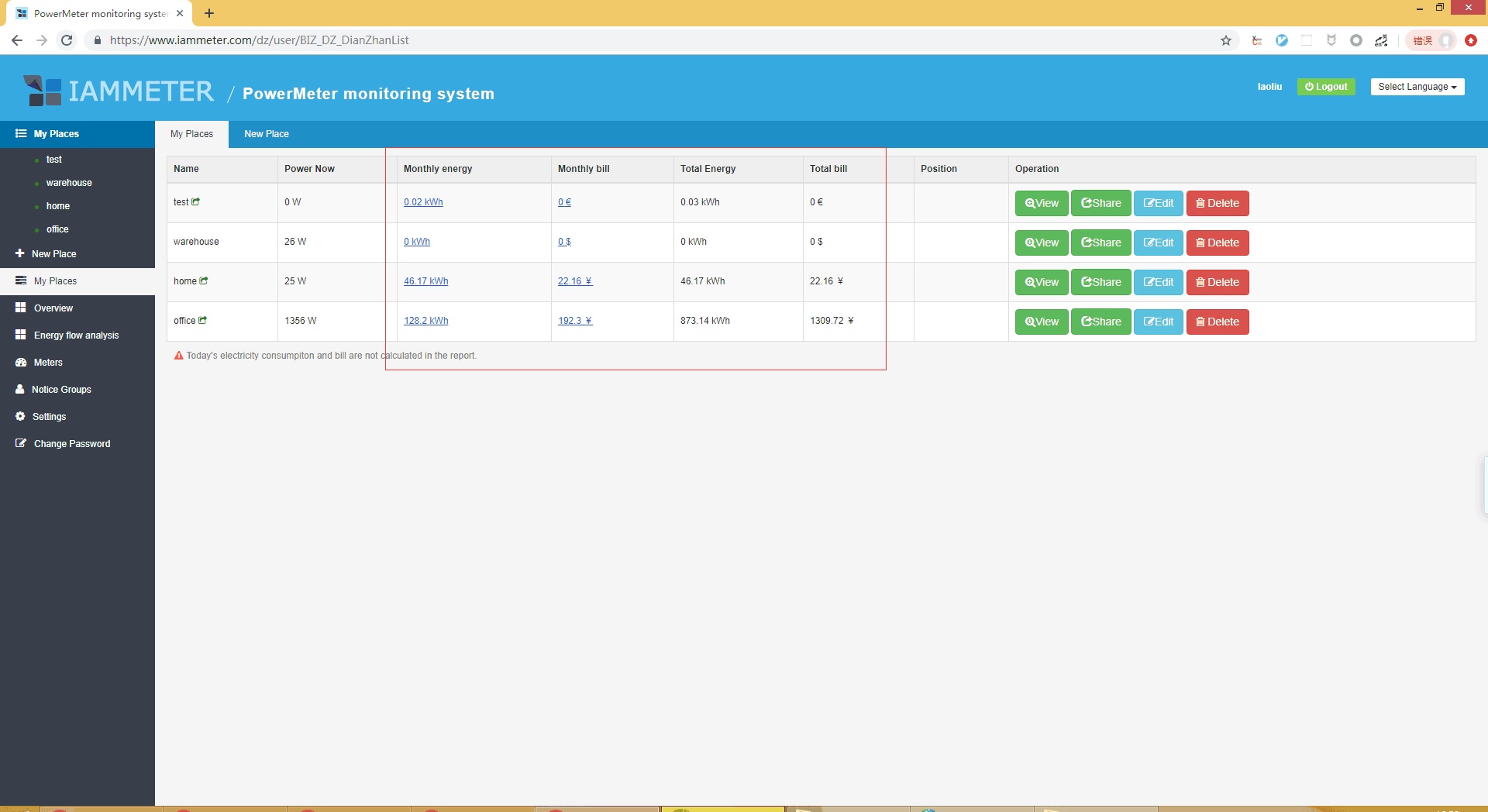
The meter records electricity use. IAMMETER Cloud displays power, energy consumption and costs calculated from your configured tariff—turning kWh into information you can use in day-to-day operations.

  • Right now: Check current power and whether equipment operation matches the work being done.
  • Daily and monthly: Follow usage and costs, and identify days with unexpected increases.
  • By time of day: Review power charts after closing, at weekends or during shutdowns.
  • After a change: Compare consumption under similar workloads and opening hours after adjusting equipment operation.
See energy and cost displays →
Site energy and cost interface example from official IAMMETER documentation
Interface example from official documentation, not a customer case study for this solution. Click to enlarge, or try the demo account for the current interface.

Costs are calculated from monitoring data and tariff settings, not issued as a utility bill. Inclusion of standing charges, demand charges and other items depends on your configuration and the billing rules supported.Read about billing reports

No need to watch the screen all day

Make sure unusual consumption gets noticed.

Set a power threshold based on normal site operation. When readings meet the alert conditions, an email prompts the responsible person to check the equipment.

Daily or monthly energy-use alerts can also flag totals that exceed expectations. Alerts help you investigate and respond sooner.

See how to configure alerts →

Start with a simple checking routine

1. Learn the normal baseline

Observe power during working hours, after closing and while essential equipment remains on.

2. Set suitable thresholds and recipients

Use supported power or energy rules to notify the person who can actually respond.

3. Investigate when an alert arrives

Check whether operation is justified or equipment has been left on, then take appropriate action.

Historical charts help investigate after-hours anomalies. Alerts that operate only outside specified working hours require separate confirmation of scheduling rules or an integration; ordinary power thresholds alone do not provide this. A notification does not automatically disconnect equipment.

Put a cost on one source of waste

Leaving it on once may cost little.
Leaving it on every night is another story.

Suppose an unnecessary 2 kW load runs for an extra 12 hours on 20 days each month, at an assumed electricity rate of CNY 1 per kWh.

If that operation is genuinely unnecessary and you eliminate it, you can reduce the associated consumption costs. The meter does not save energy by itself; it helps you find where to act.

Illustration using Chinese yuan and an assumed rate, not customer data or a savings guarantee. Changes to fixed charges are excluded; essential loads are not treated as waste.

Illustrative calculation / Avoidable extra consumption

2 kW × 12 hours × 20 days
480 kWh / month
480 kWh × CNY 1 / kWh
CNY 480 / month

Use your own equipment power, unnecessary run time and tariff to estimate the opportunity at your premises.
Start with the whole site

One suitable meter is a starting point.

First establish when electricity is used, how much is consumed and whether anything looks unusual. Then decide whether you need more detailed circuit or equipment monitoring.

01 / Select and install

Match your supply and loads

Choose for your single- or three-phase supply, current range and monitored circuits. Use a qualified electrician; rented premises also require property permission and access to the distribution board.

Explore meter models →
02 / Connect and configure

Turn readings into useful information

Set up the network, site and applicable tariff. Confirm the Cloud services and alert permissions included with your meter, then configure recipients.

Learn about alert setup →
03 / Review and improve

Start with one avoidable load

Investigate extra after-hours loads, adjust operating schedules and keep watching the results. Do not switch off essential or safety-related equipment just to lower the reading.

Try the monitoring demo →
Can one meter identify which appliance is using electricity?

Monitoring the main supply reveals overall use and unusual periods, but does not automatically identify individual appliances. Separately measuring air conditioning or production equipment requires suitable circuit monitoring, enough measurement channels or additional meters.

Is the meter purchase the only cost?

Budget for the meter, necessary installation and connectivity. Cloud services may vary by model. Confirm alert and reporting features and service duration before purchase; this solution does not promise every feature or lifetime free service with every meter.

Will installation guarantee lower bills?

Monitoring reveals issues and alerts help you respond. Savings come from reducing unnecessary operation. Well-managed premises may have less room for improvement; no fixed savings percentage or payback period is guaranteed.

Take the guesswork out of electricity use

See what you would like to know each day.

Open the demo account to explore power charts, consumption records and cost displays, then choose a monitoring setup that suits your premises.

The demo lets you explore features; it does not show proven savings for the premises or customers described on this page.